
Wix: Adding Multimedia to Pages
- Sep 30, 2025
- 3 min read
Making Your Pages Engaging and Effective
Welcome to your guide on adding multimedia to your Wix website! Incorporating videos and infographics can make your pages more dynamic, engaging, and
informative for your visitors. In this guide, we'll walk you through the process of
adding these elements to your site in a way that's easy to understand, even if you're not a technical expert. Visual content can capture attention and communicate complex information quickly, enhancing the user experience.
Why Adding Multimedia to Your Pages is Essential for Modern SEO Success
Adding multimedia content to your website pages has become absolutely crucial for achieving strong search engine rankings and preparing your site for the AI-driven future of search. Search engines like Google now prioritise websites that provide rich, engaging experiences through diverse content formats, and multimedia elements significantly boost your SEO performance in multiple ways. Images, videos, infographics, and interactive content increase the time visitors spend on your pages—a key ranking factor that signals to search engines that your content is valuable and engaging. Additionally, properly optimised multimedia provides additional opportunities to target relevant keywords through alt text, captions, file names, and video descriptions, effectively expanding your SEO footprint across multiple content types.
From an SEO perspective, multimedia content dramatically improves your chances of appearing in various search result features, including image search, video carousels, and rich snippets. When you include relevant images with descriptive alt text, your content becomes eligible for Google Images results, potentially driving significant additional traffic to your site. Videos are particularly powerful, as Google often displays video thumbnails in search results, making your listings more visually appealing and likely to receive clicks. Furthermore, multimedia content naturally attracts more backlinks and social shares, as visual content is inherently more shareable than text-only pages, creating valuable signals that boost your overall domain authority.
The rise of Large Language Models (LLMs) and AI-powered search tools has made multimedia content even more strategically important for your website's future visibility. Modern AI systems are increasingly sophisticated at understanding and interpreting visual content, meaning that well-optimised images and videos help these systems better comprehend your page's context and relevance. When you provide comprehensive alt text, detailed captions, and contextual descriptions for your multimedia elements, you're essentially feeding AI systems the information they need to accurately represent your content in AI-generated responses and recommendations. This is particularly crucial as AI-powered search features become more prevalent, with tools like Google's AI Overviews and ChatGPT's web browsing capabilities relying on rich, well-described content to provide accurate information to users.
Moreover, multimedia content significantly enhances user experience metrics that both traditional search engines and AI systems use to evaluate content quality. Pages with engaging visual elements typically see reduced bounce rates, increased session duration, and higher user satisfaction scores—all factors that contribute to improved search rankings and greater likelihood of being featured in AI-generated content summaries. By strategically incorporating relevant images, videos, and interactive elements into your pages, you're not only making your content more appealing to human visitors but also ensuring your website remains competitive in an increasingly AI-driven digital landscape where comprehensive, multimedia-rich content is becoming the standard for high-performing websites.
Step-by-Step Guide to Adding Multimedia
Here's how you can easily add videos and infographics to your Wix site.
Just follow these simple steps, and you'll be a pro in no time!
Add a Video:
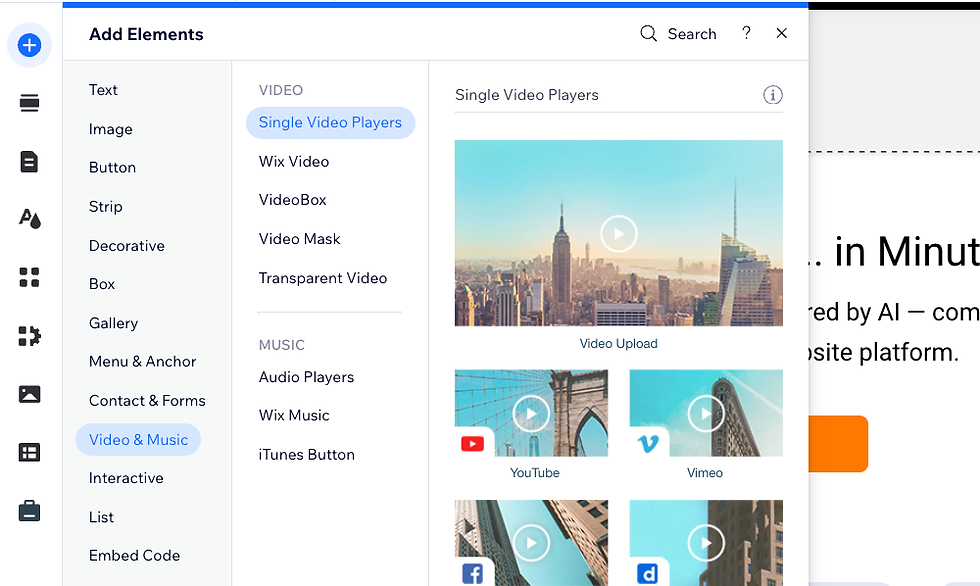
While editing a page, click the + icon on the left side of the editor.
Select Video from the media options.
You can upload your own video or embed one from YouTube or Vimeo.
Add an Infographic (as an Image):
To add an infographic, click the + icon and select Image. Upload your infographic file from your computer. You can then resize and position it on your page.

Position and Publish:
Drag your video or image to the desired location on your page.
You can resize elements by dragging the corners.
Once you are happy with the placement, click Publish.
Key Takeaways for Success
Keep it Simple: You don't need to be a tech wizard to make meaningful improvements to your site.
Be Consistent: Applying these practices regularly will help you build a stronger online presence over time.
Focus on Your Audience: Every change you make should be with your customers in mind.
We're confident that with these clear instructions, you'll be able to handle adding
multimedia to your Wix website with ease. Keep up the great work, and enjoy creating a more visually rich experience for your visitors!
Comments