
Squarespace: Adding Multimedia to Your Pages
- Oct 2, 2025
- 7 min read
Transform Your Website with Professional Images, Videos, and Interactive Content
Welcome to your comprehensive guide on adding multimedia content to your Squarespace website! One of Squarespace's greatest strengths is how beautifully it showcases visual content – the platform was designed by creatives, for creatives, and it shows in every template and feature. Whether you're adding product photos, team videos, client testimonials, or interactive galleries, Squarespace makes it simple to create a visually stunning website that engages visitors and drives results. In this guide, we'll show you how to leverage multimedia content to boost your SEO, improve user engagement, and create a professional online presence that stands out from the competition.
Why Adding Multimedia to Your Pages is Essential for Modern SEO Success
Adding multimedia content to your website pages has become absolutely crucial for achieving strong search engine rankings and preparing your site for the AI-driven future of search. Search engines like Google now prioritise websites that provide rich, engaging experiences through diverse content formats, and multimedia elements significantly boost your SEO performance in multiple ways. Images, videos, infographics, and interactive content increase the time visitors spend on your pages—a key ranking factor that signals to search engines that your content is valuable and engaging. Additionally, properly optimised multimedia provides additional opportunities to target relevant keywords through alt text, captions, file names, and video descriptions, effectively expanding your SEO footprint across multiple content types.
From an SEO perspective, multimedia content dramatically improves your chances of appearing in various search result features, including image search, video carousels, and rich snippets. When you include relevant images with descriptive alt text, your content becomes eligible for Google Images results, potentially driving significant additional traffic to your site. Videos are particularly powerful, as Google often displays video thumbnails in search results, making your listings more visually appealing and likely to receive clicks. Furthermore, multimedia content naturally attracts more backlinks and social shares, as visual content is inherently more shareable than text-only pages, creating valuable signals that boost your overall domain authority.
The rise of Large Language Models (LLMs) and AI-powered search tools has made multimedia content even more strategically important for your website's future visibility. Modern AI systems are increasingly sophisticated at understanding and interpreting visual content, meaning that well-optimised images and videos help these systems better comprehend your page's context and relevance. When you provide comprehensive alt text, detailed captions, and contextual descriptions for your multimedia elements, you're essentially feeding AI systems the information they need to accurately represent your content in AI-generated responses and recommendations. This is particularly crucial as AI-powered search features become more prevalent, with tools like Google's AI Overviews and ChatGPT's web browsing capabilities relying on rich, well-described content to provide accurate information to users.
Moreover, multimedia content significantly enhances user experience metrics that both traditional search engines and AI systems use to evaluate content quality. Pages with engaging visual elements typically see reduced bounce rates, increased session duration, and higher user satisfaction scores—all factors that contribute to improved search rankings and greater likelihood of being featured in AI-generated content summaries. By strategically incorporating relevant images, videos, and interactive elements into your pages, you're not only making your content more appealing to human visitors but also ensuring your website remains competitive in an increasingly AI-driven digital landscape where comprehensive, multimedia-rich content is becoming the standard for high-performing websites.
Squarespace's Multimedia Advantages
Before diving into the technical steps, it's important to understand why Squarespace excels at multimedia content:
Design-First Philosophy: Every Squarespace template is built to showcase visual content beautifully, with professional layouts that make your images and videos look their best.
Built-in Optimisation: Squarespace automatically optimises images for web display and mobile devices, ensuring fast loading times without sacrificing quality.
Responsive Design: All multimedia content automatically adapts to different screen sizes, ensuring your visuals look perfect on desktop, tablet, and mobile devices.
Professional Templates: Choose from templates specifically designed for photographers, artists, restaurants, and other visual-heavy businesses.
Integrated Tools: Built-in galleries, slideshows, and video players that work seamlessly with your site's design.
Types of Multimedia Content and Their Benefits
Images and Photography
SEO Benefits: Image search traffic, improved engagement, visual keyword targeting
User Benefits: Professional appearance, emotional connection, product showcasing
Best For: Product photos, team pictures, before/after shots, infographics
Videos
SEO Benefits: Video search results, increased time on page, rich snippets
User Benefits: Higher engagement, better explanation of complex topics, personal connection
Best For: Product demonstrations, testimonials, behind-the-scenes content, tutorials
Interactive Galleries
SEO Benefits: Multiple image optimisation opportunities, increased page depth
User Benefits: Engaging browsing experience, portfolio showcasing
Best For: Portfolios, product catalogues, event photos, case studies
Audio Content
SEO Benefits: Transcript opportunities, increased session duration
User Benefits: Accessibility, multitasking-friendly content consumption
Best For: Podcasts, testimonials, music samples, guided tours
Step-by-Step Guide to Adding Multimedia Content
Step 1: Preparing Your Multimedia Content
Image Preparation and Optimisation:
Before uploading to Squarespace, prepare your images for optimal performance:
File Formats:
JPEG: Best for photographs and complex images
PNG: Best for graphics with transparency or simple images
WebP: Modern format for better compression (Squarespace converts automatically)
File Size Guidelines:
Keep individual images under 500KB for optimal loading speed
For hero images: 1920x1080 pixels maximum
For gallery images: 1200x800 pixels recommended
For thumbnails: 300x300 pixels
Naming Convention:Use descriptive filenames before uploading:
Good: "manchester-web-design-team-photo.jpg"
Poor: "IMG_1234.jpg"
Step 2: Adding Images to Your Squarespace Pages
Using the Image Block:

In the Squarespace editor, click the + icon where you want to add an image
Select Image from the content blocks
Upload your image or choose from your existing library
Optimising Image Settings:
Click on your uploaded image to access settings:
Alt Text: Add descriptive text for SEO and accessibility
Example: "Professional web design team meeting in Manchester office"
Link: Link the image to another page or external URL if relevant

For more insight into Alt Text and how to use it best please see our guide:
Advanced Image Options:
Design Tab: Adjust image display options:
Aspect Ratio: Choose how the image is cropped
Overlay: Add text or colour overlays
Filters: Apply professional filters if needed
We advise you do not change these advanced image options as Squarespace has high quality settings.
Step 3: Creating Image Galleries
Setting Up a Gallery Block:
This has changed in various Squarespace versions so please use the Squarespace Guide to Gallery sections
Step 4: Adding Videos to Your Pages
Video Block Setup:

Click + to add a new block
Click on the video block to open the settings bar
Click on the Pencil to open Content panel
Select Video from the content blocks
Choose your video source:
Upload: Direct upload to Squarespace (recommended for short videos)
YouTube: Embed YouTube videos
Vimeo: Embed Vimeo videos (better for professional content)
Video SEO Optimisation:
Video Title: Add a descriptive, keyword-rich title
Description: Write a compelling description with relevant keywords
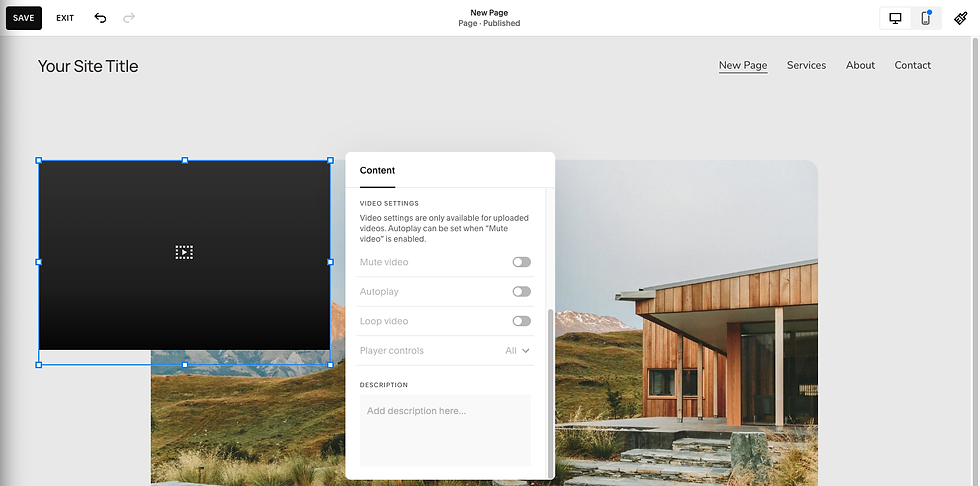
Video Performance Settings:
Autoplay: Generally avoid autoplay for better user experience
Loop: Choose whether videos should repeat
Controls: Ensure video controls are visible to users
Step 5: Adding Audio Content
Audio Block Implementation:
Click + to add a new block
Select Audio from the content blocks
Upload your audio file (MP3 format recommended)
Audio SEO Optimisation:
Audio Title: Add a descriptive title
Step 6: Advanced Multimedia Features
Background Videos:
Select a page section
Go to Design > Background
Choose Video and upload your background video
Ensure the video is optimised for web (under 10MB recommended)
Content Strategy for Multimedia SEO
Image SEO Best Practices
Alt Text Writing:
Be descriptive but concise (125 characters or less)
Include relevant keywords naturally
Describe what's actually in the image
Don't start with "Image of" or "Picture of"
Examples:
Good: "Handcrafted leather handbag with brass hardware on marble surface"
Poor: "Image of product"
File Naming Strategy:
Use hyphens to separate words
Include relevant keywords
Keep names descriptive but not too long
Use lowercase letters
Video SEO Optimisation
Video Titles:
Include primary keywords in the title
Make titles compelling and click-worthy
Keep under 60 characters for best display
Video Descriptions:
Write detailed descriptions (200+ words when possible)
Include relevant keywords naturally
Add timestamps for longer videos
Include calls to action
Video Thumbnails:
Use high-quality, engaging thumbnail images
Include text overlays if appropriate
Ensure thumbnails are relevant to content
Test different thumbnails to improve click-through rates
Creating Multimedia Content That Converts
Product Photography:
Show products from multiple angles
Include lifestyle shots showing products in use
Use consistent lighting and backgrounds
Add zoom functionality for detail viewing
Team and About Photos:
Use professional, friendly photos
Show your team in action
Include behind-the-scenes content
Maintain consistent style across all photos
Process and Service Videos:
Show your work process
Include before/after transformations
Add customer testimonials
Keep videos concise and engaging
Technical Optimisation for Better Performance
Image Compression and Loading
Squarespace's Built-in Optimisation
Squarespace automatically:
Compresses images for optimal web performance
Creates multiple sizes for different devices
Implements lazy loading for faster page speeds
Converts images to modern formats when supported
Manual Optimisation Tips:
Quality Settings: Adjust image quality in your site settings
Progressive Loading: Enable progressive JPEG loading
Image Sizing: Upload images at appropriate dimensions
Video Performance Optimisation
Video Hosting Recommendations:
YouTube: Best for public videos and SEO benefits
Vimeo: Better for professional, branded content
Direct Upload: Only for short videos (under 2 minutes)
Video Compression:
Keep video files under 100MB for direct uploads
Use H.264 encoding for best compatibility
Optimise for web before uploading
Troubleshooting Common Multimedia Issues
Problem: Images Loading Slowly
Solutions: Reduce image file sizes, use proper formats, check upload connection, adjust image quality
Problem: Videos Not Playing Properly
Solutions: Check formats, keep under size limits, test across devices, consider YouTube/Vimeo
Problem: Poor Mobile Display
Solutions: Preview regularly, adjust aspect ratios, test gallery layouts, use mobile editing features
Advanced Multimedia Strategies
Creating Multimedia Content Series:
Blog post series with visuals
Video playlists
Consistent branding
Multimedia for Different Business Types:
E-commerce: Product photography, demos, testimonials
Service: Before/after galleries, process videos, team intros
Creative Pros: Portfolio galleries, time-lapse creation videos, tutorials
Key Takeaways for Multimedia Success
Quality Over Quantity: Better to have fewer, high-quality multimedia elements than many poor-quality ones.
Optimise for Performance: Balance visual quality with loading speed.
Think Mobile-First: Most visitors will view on mobile.
Tell Your Story: Use multimedia to showcase expertise and build connections.
Measure and Improve: Use analytics to guide what content you create more of.
Stay Consistent: Maintain a consistent visual style across all multimedia content.
Comments